
How to Run a Conflict Check at Your Law Firm (With a Checklist)
A step-by-step guide to running a conflict check at your law firm, from collecting names at intake to documenting the decision, plus a checklist your team can use on every new matter.
On this page
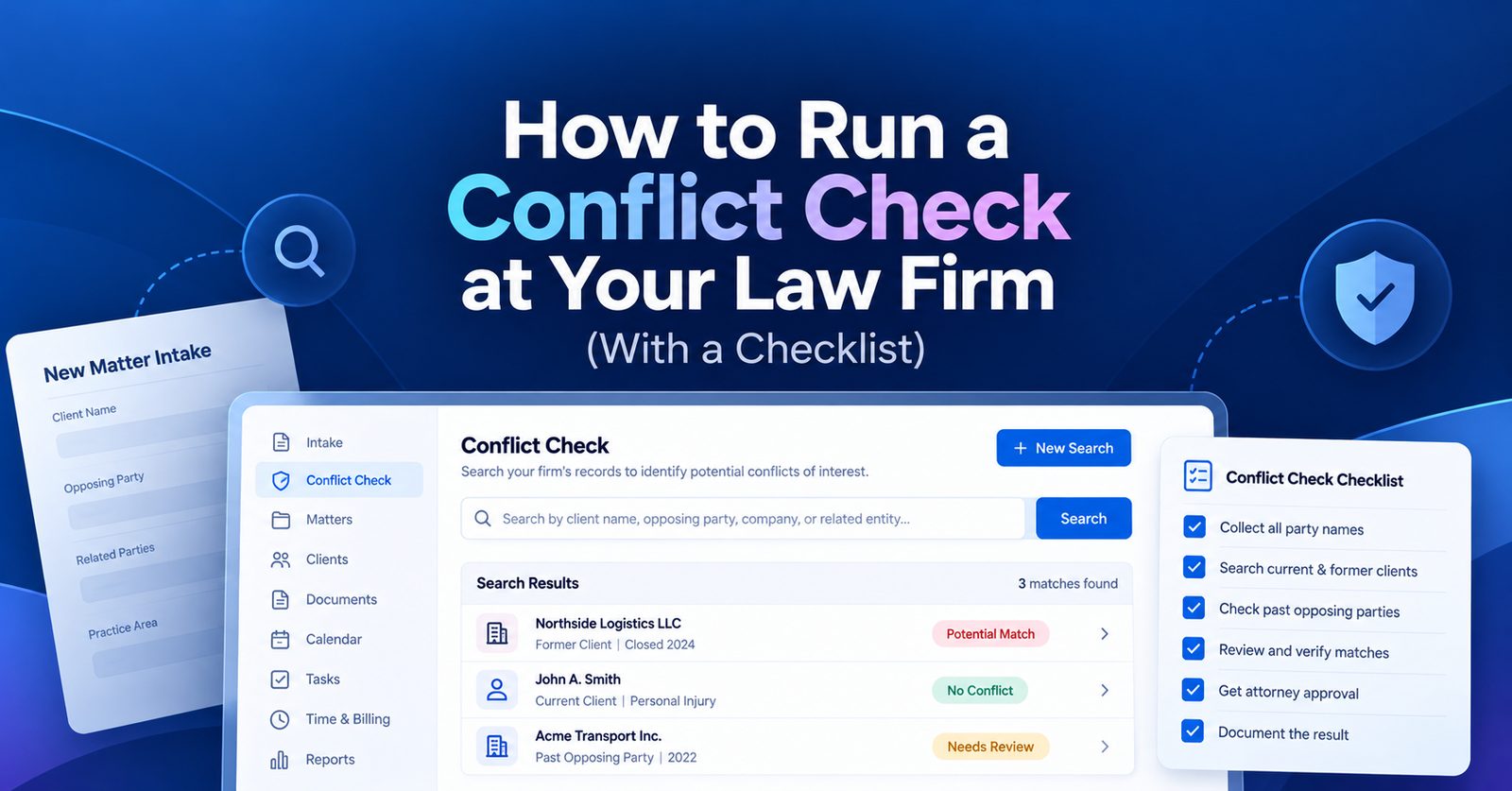
A conflict check is a search of your firm's records to make sure taking on a new client or matter will not create a conflict of interest. To run one, collect the names of everyone involved in the matter, search them against your current clients, former clients, prospective clients, and past opposing parties, review any matches, and have an attorney decide whether the firm can take the matter. Then record the result before any engagement letter goes out.
This guide covers each step, when to run a check, what to do when the search finds a match, and a checklist your intake team can use on every new matter.
Why conflict checks matter
The ABA Model Rules of Professional Conduct, which most states follow in some form, set out three main types of conflicts:
- Current client conflicts (Rule 1.7). The new matter is directly against an existing client, or your duties to someone else could limit how well you represent the new client.
- Former client conflicts (Rule 1.9). The new matter is against a former client in the same or a substantially related matter.
- Prospective client conflicts (Rule 1.18). Someone consulted your firm but never hired you, and they shared information that could hurt them in the new matter.
Under Rule 1.10, a conflict for one lawyer is usually a conflict for the whole firm. That is why the check has to search the firm's records, not just one attorney's memory.
Missing a conflict can lead to disqualification partway through a case, a bar complaint, giving up fees, and a client who has to start over with new counsel.
When to run a conflict check
Run a check at each of these points:
- At first contact, before a consultation is scheduled
- Before you send an engagement letter
- When a new party joins an existing matter, such as a new defendant, insurer, or witness
- When a lateral attorney or new staff member joins the firm
- When your firm merges with or takes over another practice
The first check matters most, and it should happen early. Under Rule 1.18, even a short consultation can create duties to a prospective client. Ask for names at first contact, but keep the details of the matter brief until the check is clear.
How to run a conflict check, step by step
Step 1: Collect the right information at intake
Your search is only as good as the names you put into it. For every new matter, collect:
- The prospective client's full legal name, former names, maiden name, and nicknames
- Opposing parties, including companies, their parent companies, and subsidiaries
- Opposing counsel
- Related people and entities, such as spouses, business partners, insurers, and co-defendants
- Key witnesses and experts, where known
For businesses, add officers, directors, owners, and any trade names or DBAs.
Step 2: Search every name against your records
Search each name against current clients, former clients, declined prospects, past opposing parties, and anyone else stored in your matter records. Try spelling variations, partial names, and former names. A search for "Jon Smith" should also catch "Jonathan Smith" and "J. Smith."
Step 3: Review every match
A match does not always mean a conflict. Many hits turn out to be different people with the same name. Compare addresses, dates of birth, and company details to rule out false matches. For real matches, note who the person is, what the earlier matter was, and which side the firm was on.
Step 4: Ask your team
Not every relationship is in the database. Send a short note to attorneys and staff listing the new parties and asking if anyone has a personal, family, or business connection. Record who you asked and what they said.
Step 5: Escalate to an attorney for a decision
The person who ran the search should not be the one who clears a possible conflict. Send it to a designated attorney or the managing partner. They decide one of three things: the matter is clear, it can go ahead with a waiver, or the firm must decline.
Step 6: Get a waiver or decline in writing
Some conflicts can be waived. Rules 1.7 and 1.9 allow it when every affected client gives informed consent, confirmed in writing, and the lawyer reasonably believes they can still represent the client well. Some conflicts cannot be waived, such as representing both sides in the same lawsuit.
If you decline, send a non-engagement letter. It should say the firm is not taking the matter, suggest the person find other counsel promptly, and point out that legal deadlines may apply.
Step 7: Document the result
Save the names searched, the date, the results, who reviewed them, and the decision. If a question comes up later, this record shows the firm did its job.
Example
Example: what a match looks like
A prospective client wants to sue Northside Logistics LLC over a truck accident. The search shows the firm reviewed a warehouse lease for Northside Logistics two years ago.
Northside is a former client, so Rule 1.9 applies. The reviewing attorney looks at whether the lease work is substantially related to the accident claim, and whether the firm learned anything confidential that could be used against Northside now. If the matters are unrelated, the firm may be able to proceed. If there is any real overlap, the firm either gets Northside's informed written consent or declines.
Either way, the decision and the reasons go into the file.
Conflict check checklist
Copy this list into your intake process.
Before the consultation
- Collect the prospective client's full name, former names, and nicknames
- Collect all opposing parties, including related companies
- Collect opposing counsel, insurers, and other related parties
- Limit the matter details taken until the check is clear
Running the search
- Search current clients, former clients, and declined prospects
- Search past opposing parties and related parties
- Search spelling variations and partial names
- Rule out false matches using addresses, dates of birth, or company details
Review and decision
- Circulate new party names to attorneys and staff
- Send any real match to the designated attorney
- Record the decision: clear, waiver, or decline
- Get informed consent in writing if a waiver is used
- Send a non-engagement letter if the firm declines
After the check
- Save the search terms, results, reviewer, and decision with the date
- Add every new party to the firm's records
- Run a new check if parties change during the matter
Running conflict checks with software
Small firms often start with a spreadsheet, but it only works if every matter and every party is entered every time. As the firm grows, names get missed and old records go stale.
Conflict checks work best when they are part of intake. In CaseQube, the conflict check runs as part of the intake form, against the same records your firm uses to manage its matters, so new parties are added to the database as each matter opens.
Frequently asked questions
What is a conflict check at a law firm?
A conflict check is a search of the firm's client and matter records to confirm that taking on a new client or matter will not create a conflict of interest with a current client, former client, or prospective client.
When should a law firm run a conflict check?
Run one at first contact, before sending an engagement letter, whenever a new party joins a matter, when a new attorney or staff member joins the firm, and after a firm merger.
What information do you need to run a conflict check?
You need the full names and name variations of the prospective client, all opposing parties and related companies, opposing counsel, and related people such as spouses, business partners, insurers, and co-defendants.
How long does a conflict check take?
A simple check with good records can take minutes. A matter with many parties or a real match can take longer, because an attorney has to review it before the firm decides.
Do you need to run a conflict check on prospective clients?
Yes. Under ABA Model Rule 1.18, a firm can owe duties to someone who only consulted it. Prospective clients should also be stored in your records so future checks can find them.
What happens if a conflict check finds a match?
Check whether it is the same person or company. If it is, an attorney reviews the earlier matter and decides whether the firm is clear, needs a waiver, or must decline.
Can a conflict of interest be waived?
Many can. The affected clients must give informed consent, confirmed in writing, and the lawyer must reasonably believe they can still represent the client competently. Some conflicts, like representing both sides in the same lawsuit, cannot be waived.
What if a conflict is discovered after the firm has taken the case?
Stop substantive work and bring it to the managing partner or ethics counsel right away. Depending on the conflict, the firm may need a waiver or may have to withdraw.
Should you run conflict checks when hiring a new attorney?
Yes. A lateral hire brings their former clients and matters with them. Check those names against your firm's records before the attorney starts.
Can a small firm run conflict checks with a spreadsheet?
It can, as long as every client, opposing party, and related party is entered for every matter. Many firms move to software once the number of matters makes manual searching unreliable.
Ready to simplify your case management?
See how CaseQube keeps every matter, document, and deadline in one place.
Book a DemoRelated posts

Client Intake Best Practices for Mid-Size Law Firms in 2026
Mid-size firms rarely lose leads from lack of effort. They lose them to too many front doors and no single owner. Here is what to measure and what to change.
 Ramit KaurOctober 13, 2026 · 7 min read
How Personal Injury Settlements Are Distributed: A Step-by-Step Guide for Law Firms
A step-by-step guide to the settlement disbursement process, from the trust deposit and lien payoffs to the settlement statement and final payout, with a worked example.
Ramit KaurOctober 13, 2026 · 7 min read
Case Management vs. Matter Management: What's the Difference for Law Firms?
Every case is a matter, but not every matter is a case. A plain guide to what each term means for a law firm, how they compare, and which one your firm needs.
Ramit KaurOctober 13, 2026 · 8 min read